
Multi-project setups#
Cosmos supports multi-project dbt architectures where multiple dbt projects reference each other’s models. This is commonly achieved using dbt-loom, a python package that enables cross-project references by injecting models from upstream projects into downstream projects.
This allows you to:
Split large dbt projects into smaller, focused domain projects
Share common staging models across multiple downstream projects
Maintain clear boundaries between data domains while allowing references
Cosmos works with dbt-loom out of the box, automatically handling external node references.
How dbt-loom works#
dbt-loom enables cross-project references by:
Reading the
manifest.jsonfrom upstream dbt projectsInjecting the upstream models’ metadata into the downstream project’s namespace
Allowing cross-project references using the dbt Mesh syntax:
{{ ref('upstream_project', 'model_name') }}
How Cosmos handles dbt-loom#
When Cosmos parses a dbt project that uses dbt-loom, it encounters two types of nodes:
Local nodes: Models that exist as files in the current project
External nodes: Models injected by dbt-loom from upstream projects (no local file path)
Cosmos automatically:
Skips external nodes during DAG generation (they don’t have file paths)
Creates Apache Airflow® tasks only for local nodes in each project
Maintains proper dependency tracking within each project
This means you don’t need any special configuration - Cosmos works with dbt-loom projects automatically.
Requirements#
For dbt-loom to work with Cosmos:
For DAG parsing: The upstream project’s
manifest.jsonmust be accessibleFor task execution: The downstream project must be able to query upstream tables
dbt-loom installation: dbt-loom must be installed in the same Python virtual environment as the dbt executable used by Cosmos. This applies whether you’re using a system-wide dbt installation or a project-specific virtual environment via
ExecutionConfig.
The upstream manifest can be generated by running any dbt command that parses the project:
cd <upstream_dbt_project>
dbt parse    # Fastest - just generates manifest
# or
dbt compile  # Also generates compiled SQL
# or
dbt ls       # Lists resources and generates manifest
Configuration example#
Project structure#
A typical dbt-loom setup has an upstream project and one or more downstream projects:
dbt/
├── upstream/           # Upstream project (staging, intermediate)
│   ├── dbt_project.yml
│   ├── profiles.yml
│   ├── models/
│   │   ├── staging/
│   │   │   └── stg_customers.sql
│   │   └── intermediate/
│   │       └── int_customer_orders.sql
│   └── target/
│       └── manifest.json        # Required by downstream projects
│
└── downstream/          # Downstream project (marts, reports)
    ├── dbt_project.yml
    ├── profiles.yml
    ├── dbt_loom.config.yml      # Points to upstream manifest
    ├── dependencies.yml         # Includes dbt-loom package
    └── models/
        └── fct_revenue.sql      # References upstream models
Upstream project configuration#
The upstream project exposes models as public for cross-project access:
dbt_project.yml:
name: 'upstream'
version: '1.0.0'
config-version: 2
profile: 'upstream'

models:
  upstream:
    staging:
      +materialized: view
      +access: public          # Required for dbt-loom
    intermediate:
      +materialized: view
      +access: public
Downstream project configuration#
The downstream project configures dbt-loom to read from the upstream manifest.
Note that dbt-loom is installed as a Python package (pip install dbt-loom), not as a dbt package.
dbt_loom.config.yml:
manifests:
  - name: upstream
    type: file
    config:
      # Use environment variable for flexibility
      path: '{{ env_var("UPSTREAM_MANIFEST_PATH", "../upstream/target/manifest.json") }}'

enable_telemetry: false
Model using cross-project ref:
-- fct_revenue.sql
select
    c.customer_id,
    c.customer_name,
    sum(o.amount) as total_revenue
from {{ ref('upstream', 'stg_customers') }} c
left join {{ ref('upstream', 'int_customer_orders') }} o
    on c.customer_id = o.customer_id
group by 1, 2
Cosmos DAG Configuration#
You can use either separate DAGs or a combined DAG with task groups.
Note
Each project can use a different profile configuration, allowing you to:
Write to different schemas (e.g.,
platformvsfinance)Use different databases or data warehouses entirely
Use different credentials or Airflow connections per project
This flexibility is useful when different teams own different projects or when data needs to flow across database boundaries.
Important: The downstream profile must have read access to the tables/views created by the upstream project. Ensure appropriate grants or cross-database access is configured.
Option 1: Combined DAG with Task Groups using dbt ls Load Mode (Recommended)
# =============================================================================
# Combined DAG with Task Groups - Upstream runs first, then Downstream
# =============================================================================

with DAG(
    dag_id="cross_project_dbt_ls_dag",
    start_date=datetime(2024, 1, 1),
    schedule=None,
    catchup=False,
    default_args={"retries": 0},
    tags=["dbt-loom", "dbt ls"],
    doc_md=__doc__,
) as dag:

    # -------------------------------------------------------------------------
    # Upstream Task Group - Core Data Platform (upstream)
    # -------------------------------------------------------------------------
    # Contains foundational models (staging, intermediate) exposed as public
    # models for the downstream project to reference via dbt-loom.

    upstream_profile_config = ProfileConfig(
        profile_name="upstream",
        target_name="dev",
        profile_mapping=PostgresUserPasswordProfileMapping(
            conn_id=POSTGRES_CONN_ID,
            profile_args={"schema": "platform", "threads": 4},
        ),
    )

    upstream_task_group = DbtTaskGroup(
        group_id="upstream",
        project_config=ProjectConfig(
            dbt_project_path=DBT_UPSTREAM_PROJECT_PATH,
        ),
        profile_config=upstream_profile_config,
        render_config=RenderConfig(
            dbt_deps=True,
        ),
        execution_config=ExecutionConfig(
            dbt_executable_path=DBT_EXECUTABLE_PATH,
        ),
        operator_args={
            "install_deps": True,
        },
    )

    # -------------------------------------------------------------------------
    # Downstream Task Group - Finance Domain Models (downstream)
    # -------------------------------------------------------------------------
    # Uses dbt-loom to reference public models from the upstream project.
    # Cosmos skips external nodes (those without file paths) during parsing
    # and only creates tasks for this project's own models.

    downstream_profile_config = ProfileConfig(
        profile_name="downstream",
        target_name="dev",
        profile_mapping=PostgresUserPasswordProfileMapping(
            conn_id=POSTGRES_CONN_ID,
            profile_args={"schema": "finance", "threads": 4},
        ),
    )

    # Environment variables for dbt-loom to find the upstream manifest
    # dbt_loom_env_vars = {
    #     "PLATFORM_MANIFEST_PATH": str(DBT_UPSTREAM_PROJECT_PATH / "target" / "manifest.json"),
    # }

    downstream_task_group = DbtTaskGroup(
        group_id="downstream",
        project_config=ProjectConfig(
            dbt_project_path=DBT_DOWNSTREAM_PROJECT_PATH,
        ),
        profile_config=downstream_profile_config,
        render_config=RenderConfig(
            dbt_deps=True,
            # For dbt loom environment variable configured upstream project's manifest
            # env_vars=dbt_loom_env_vars,
        ),
        operator_args={
            "install_deps": True,
            # For dbt loom environment variable configured upstream project's manifest
            # "env": dbt_loom_env_vars,
        },
    )

    # Chain: Upstream runs first, then Downstream
    upstream_task_group >> downstream_task_group
Option 2: Combined DAG with Task Groups using Manifest Load Mode
This option uses pre-generated manifest.json files for faster DAG parsing (no dbt ls execution required).
# =============================================================================
# Combined DAG with Task Groups - Using DBT_MANIFEST Load Mode
# =============================================================================

with DAG(
    dag_id="cross_project_manifest_dag",
    start_date=datetime(2024, 1, 1),
    schedule=None,
    catchup=False,
    default_args={"retries": 0},
    tags=["dbt-loom", "manifest"],
    doc_md=__doc__,
) as dag:

    # -------------------------------------------------------------------------
    # Upstream Task Group - Core Data Platform (upstream)
    # -------------------------------------------------------------------------

    upstream_profile_config = ProfileConfig(
        profile_name="upstream",
        target_name="dev",
        profile_mapping=PostgresUserPasswordProfileMapping(
            conn_id=POSTGRES_CONN_ID,
            profile_args={"schema": "platform", "threads": 4},
        ),
    )

    upstream_task_group = DbtTaskGroup(
        group_id="upstream",
        project_config=ProjectConfig(
            # Specify the manifest path for faster parsing
            manifest_path=str(UPSTREAM_MANIFEST_PATH),
            project_name="upstream",
            # For remote manifests (S3/GCS/Azure), add:
            # manifest_conn_id=MANIFEST_CONN_ID,
        ),
        profile_config=upstream_profile_config,
        execution_config=ExecutionConfig(
            dbt_project_path=DBT_UPSTREAM_PROJECT_PATH, dbt_executable_path=DBT_EXECUTABLE_PATH
        ),
        render_config=RenderConfig(
            # Use manifest-based parsing (no dbt ls required)
            load_method=LoadMode.DBT_MANIFEST,
            # Note: dbt_deps is not needed for manifest mode parsing
            # but you may still want install_deps=True for task execution
        ),
        operator_args={
            "install_deps": True,
        },
    )

    # -------------------------------------------------------------------------
    # Downstream Task Group - Finance Domain Models
    # -------------------------------------------------------------------------

    downstream_profile_config = ProfileConfig(
        profile_name="downstream",
        target_name="dev",
        profile_mapping=PostgresUserPasswordProfileMapping(
            conn_id=POSTGRES_CONN_ID,
            profile_args={"schema": "finance"},
        ),
    )

    # Environment variables for dbt-loom to find the upstream manifest
    # dbt_loom_env_vars = {
    #     "PLATFORM_MANIFEST_PATH": str(DBT_UPSTREAM_PROJECT_PATH / "target" / "manifest.json"),
    # }

    downstream_task_group = DbtTaskGroup(
        group_id="downstream_finance",
        project_config=ProjectConfig(
            # Specify the manifest path for faster parsing
            manifest_path=str(DOWNSTREAM_MANIFEST_PATH),
            project_name="downstream",
            # For remote manifests (S3/GCS/Azure), add:
            # manifest_conn_id=MANIFEST_CONN_ID,
            # For dbt loom environment variable configured upstream project's manifest
            # env_vars=dbt_loom_env_vars,
        ),
        profile_config=downstream_profile_config,
        execution_config=ExecutionConfig(
            dbt_project_path=DBT_DOWNSTREAM_PROJECT_PATH, dbt_executable_path="/usr/local/bin/dbt"
        ),
        render_config=RenderConfig(
            # Use manifest-based parsing (no dbt ls required)
            load_method=LoadMode.DBT_MANIFEST,
        ),
        operator_args={
            "install_deps": True,
        },
    )

    # Chain: Upstream runs first, then Downstream
    upstream_task_group >> downstream_task_group
Note
Prerequisites for Manifest Load Mode:
Generate
manifest.jsonfor both projects before deploying (dbt compileordbt parse)For remote manifests (S3/GCS/Azure), configure the appropriate Airflow connection and use
manifest_conn_id
Option 3: Separate DAGs with Assets (Airflow 3) / Datasets (Airflow 2.4+)
Cosmos automatically emits assets from each task when emit_datasets=True (the default).
You can use these assets to trigger downstream DAGs.
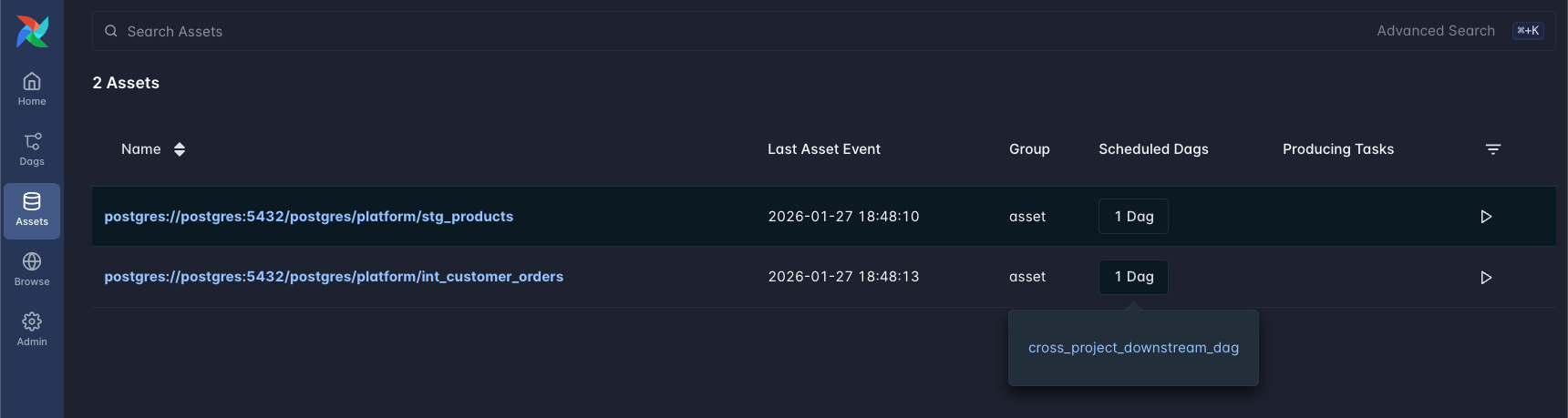
Assets emitted by dbt models showing the OpenLineage-based URIs.#
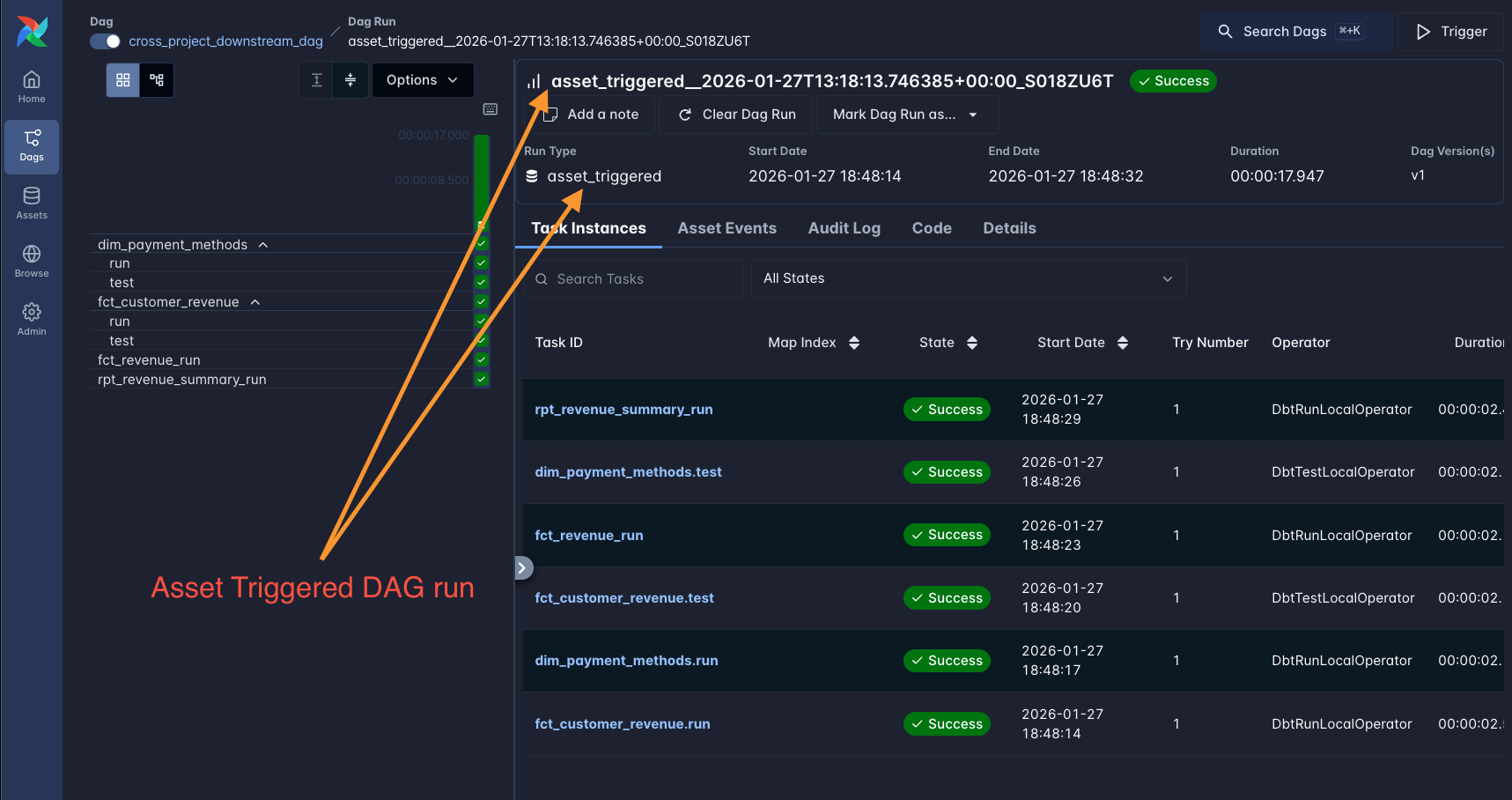
A downstream DAG triggered by upstream model assets.#
Note
Airflow 3 renamed “Datasets” to “Assets”. The functionality is the same, but the import
changes from from airflow.datasets import Dataset to from airflow.sdk import Asset.
Understanding Asset URIs in Cosmos
Cosmos uses OpenLineage to extract lineage information and generates Asset URIs based on the actual database tables. The URI format follows the pattern:
{db_type}://{host}:{port}/{database}/{schema}/{table_name}
For example, a Postgres model stg_customers in schema platform generates:
postgres://postgres:5432/postgres/platform/stg_customers
Example: Trigger Downstream DAG on Specific Upstream Models (Airflow 3)
from airflow.sdk import Asset
from cosmos import DbtDag, ProfileConfig, ProjectConfig, RenderConfig

# Define assets using the OpenLineage-based URIs
# Format: {db_type}://{host}:{port}/{database}/{schema}/{table_name}
UPSTREAM_CUSTOMERS = Asset("postgres://postgres:5432/postgres/platform/stg_customers")
UPSTREAM_ORDERS = Asset(
    "postgres://postgres:5432/postgres/platform/int_customer_orders"
)

# Upstream DAG - tasks automatically emit assets
upstream_dag = DbtDag(
    dag_id="upstream_dag",
    project_config=ProjectConfig(dbt_project_path=UPSTREAM_PATH),
    profile_config=ProfileConfig(...),
    render_config=RenderConfig(
        emit_datasets=True,  # Default - each task emits an asset
    ),
    schedule="@daily",
)

# Downstream DAG triggers when specific upstream models complete
downstream_dag = DbtDag(
    dag_id="downstream_dag",
    project_config=ProjectConfig(dbt_project_path=DOWNSTREAM_PATH),
    profile_config=ProfileConfig(...),
    schedule=[UPSTREAM_CUSTOMERS, UPSTREAM_ORDERS],  # Triggers on upstream completion
)
Example: Using AssetAlias (Airflow 3) / DatasetAlias (Airflow 2.10+)
AssetAlias provides more flexible asset matching using URI patterns:
from airflow.sdk import AssetAlias
from cosmos import DbtDag, ProfileConfig, ProjectConfig

# Downstream DAG triggers on any asset matching the alias pattern
downstream_dag = DbtDag(
    dag_id="downstream_dag",
    project_config=ProjectConfig(dbt_project_path=DOWNSTREAM_PATH),
    profile_config=ProfileConfig(...),
    schedule=[
        AssetAlias(
            name="postgres://postgres:5432/postgres/platform/int_customer_orders"
        )
    ],
)
Example: Manual Asset for DAG-Level Dependency
If you want a single asset to represent the entire upstream DAG completion, add a final task that emits a custom asset:
from airflow import DAG
from airflow.sdk import Asset
from airflow.operators.empty import EmptyOperator
from cosmos import DbtTaskGroup, ProfileConfig, ProjectConfig

UPSTREAM_COMPLETE = Asset("upstream_platform_complete")

with DAG(
    dag_id="upstream_dag",
    schedule="@daily",
    # ...
) as upstream_dag:

    upstream_tasks = DbtTaskGroup(
        group_id="upstream_platform",
        project_config=ProjectConfig(dbt_project_path=UPSTREAM_PATH),
        profile_config=ProfileConfig(...),
    )

    # Final task that emits a single "completion" asset
    mark_complete = EmptyOperator(
        task_id="mark_complete",
        outlets=[UPSTREAM_COMPLETE],
    )

    upstream_tasks >> mark_complete

# Downstream DAG triggers on the completion asset
downstream_dag = DbtDag(
    dag_id="downstream_dag",
    project_config=ProjectConfig(dbt_project_path=DOWNSTREAM_PATH),
    profile_config=ProfileConfig(...),
    schedule=[UPSTREAM_COMPLETE],
)
Disabling Asset Emission
To disable automatic asset emission:
from cosmos import DbtDag, RenderConfig

dag = DbtDag(
    dag_id="my_dag",
    render_config=RenderConfig(emit_datasets=False),
    # ...
)
Bidirectional cross-project references#
The setups above assume a clean upstream/downstream split: one project only publishes models, the other only consumes them. Some organizations don’t have that split - instead, two projects each expose a model consumed by the other. This works with Cosmos and dbt-loom as long as the dependency is acyclic at the individual model level (project A’s model that project B consumes must not itself depend, even indirectly, on the model project A consumes from project B).
project_a                                  project_b
├── stg_a_customers (public)  ────────►    rpt_b_customer_summary
└── rpt_a_customer_orders     ◄────────    stg_b_orders (public)
Both projects need their own dbt_loom.config.yml (pointing at each other’s manifest), and
both need +access: public on the model they expose.
Generating the manifests requires a specific bootstrap order
dbt-loom eagerly loads every manifest file referenced in its config as soon as it initializes -
so you cannot generate both projects’ manifests from a clean slate at the same time. One project
has to be parseable first, before its own cross-referencing model and dbt_loom.config.yml
exist:
Build
project_bwithout its cross-referencing model and without itsdbt_loom.config.ymlyet - just the model it exposes.cd project_b && dbt parse # produces an initial project_b/target/manifest.json
Build
project_afully, including itsdbt_loom.config.yml(pointing atproject_b’s manifest, which now exists).cd project_a && dbt parse # resolves ref('project_b', ...) via loom
Add
project_b’s cross-referencing model and itsdbt_loom.config.yml(pointing atproject_a’s manifest, which now exists from step 2), then parseproject_bagain.cd project_b && dbt parse # resolves ref('project_a', ...) via loom
After this one-time bootstrap, both manifest files just persist on disk, so any future incremental change only needs the other side’s last-generated manifest to already be present - there’s no need to repeat the bootstrap.
Why can’t I just generate both manifests fresh in one shot?
Two things have to both succeed for a cross-project ref() to resolve, and neither can be
skipped:
dbt-loom has to successfully load the other project’s manifest file and inject its public nodes into the current project’s in-memory manifest. If that file doesn’t exist yet, dbt-loom raises its own configuration error before parsing even starts.
Independently of dbt-loom, dbt-core’s compiler resolves every
ref()against whatever nodes exist in the manifest at that point (this is the same generic check that would flag a plain typo in a normal, single-projectref()call). If dbt-loom didn’t inject the node - for any reason, including simply not being configured - dbt-core has no way to tell “this is a cross-project ref dbt-loom should have resolved” from “this ref target doesn’t exist”, and raises the same generic dependency-not-found compilation error either way.
In other words, there’s no way to defer resolution to execution time: both projects’ manifests have to be complete and internally consistent before either one can be parsed.
Execution order in Airflow
Cosmos doesn’t wire cross-project task dependencies - it just drops dbt-loom’s externally
injected nodes from the task graph. For a one-directional setup this doesn’t matter (the
downstream task group already comes after the upstream one). For a bidirectional setup, a flat
project_a_task_group >> project_b_task_group isn’t enough, because each project also needs
the other project’s table to already exist. Split each project into a task group for the
model(s) it exposes and a separate task group for the model(s) that consume the other project,
then depend both “consumer” task groups on both “exposed model” task groups:
# =============================================================================
# Combined DAG with Task Groups - Using DBT_MANIFEST Load Mode
# =============================================================================

with DAG(
    dag_id="cross_project_bidirectional_dag",
    start_date=datetime(2024, 1, 1),
    schedule=None,
    catchup=False,
    default_args={"retries": 0},
    tags=["dbt-loom", "manifest", "bidirectional"],
    doc_md=__doc__,
) as dag:

    # Both leaf (stage1) models are independent of each other and run first.
    # The "+" pulls in each model's seed as well.
    a_stage1 = _task_group(
        "project_a_stage1",
        DBT_PROJECT_A_PATH,
        PROJECT_A_MANIFEST_PATH,
        "project_a",
        "project_a",
        select=["+stg_a_customers"],
    )

    b_stage1 = _task_group(
        "project_b_stage1",
        DBT_PROJECT_B_PATH,
        PROJECT_B_MANIFEST_PATH,
        "project_b",
        "project_b",
        select=["+stg_b_orders"],
    )

    # Both report (stage2) models each need BOTH leaves materialized first.
    a_stage2 = _task_group(
        "project_a_stage2",
        DBT_PROJECT_A_PATH,
        PROJECT_A_MANIFEST_PATH,
        "project_a",
        "project_a",
        select=["rpt_a_customer_orders"],
    )

    b_stage2 = _task_group(
        "project_b_stage2",
        DBT_PROJECT_B_PATH,
        PROJECT_B_MANIFEST_PATH,
        "project_b",
        "project_b",
        select=["rpt_b_customer_summary"],
    )

    [a_stage1, b_stage1] >> a_stage2
    [a_stage1, b_stage1] >> b_stage2
Cross-project sources#
dbt-loom handles model references but does not directly support cross-project source references
({{ source('upstream_project', 'table') }}). Here are the recommended patterns:
Pattern 1: Wrap Sources in Staging Models (Recommended)
Define sources in the upstream project and expose them via staging models:
upstream_platform/
└── models/
    └── staging/
        ├── sources.yml          # Source definition
        └── stg_raw_orders.sql   # Staging model wrapping the source
sources.yml (upstream):
version: 2
sources:
  - name: raw_data
    schema: raw
    tables:
      - name: orders
stg_raw_orders.sql (upstream):
{{ config(materialized='view', access='public') }}

select * from {{ source('raw_data', 'orders') }}
Now the downstream project references the staging model instead of the source:
-- downstream model
select * from {{ ref('upstream_platform', 'stg_raw_orders') }}
Pattern 2: Duplicate Source Definitions
If you must reference the same raw table in multiple projects, define the source in each project:
# In both upstream and downstream projects
version: 2
sources:
  - name: shared_raw_data
    database: "{{ env_var('RAW_DATABASE') }}"
    schema: raw
    tables:
      - name: orders
This approach requires keeping source definitions in sync across projects.
Cross-project macros#
dbt-loom does not handle macro sharing. Macros are resolved at compile time within each project. Here are the recommended patterns for sharing macros:
Pattern 1: Create a Shared dbt Package (Recommended)
Create a separate dbt package containing shared macros and install it in all projects:
shared_macros/                    # Shared package (separate repo)
├── dbt_project.yml
└── macros/
    ├── generate_schema_name.sql
    ├── cents_to_dollars.sql
    └── hash_columns.sql
dbt_project.yml (shared package):
name: 'company_shared_macros'
version: '1.0.0'
config-version: 2
Install in each project via packages.yml or dependencies.yml:
packages:
  # From git repository
  - git: "https://github.com/your-org/company-shared-macros.git"
    revision: v1.0.0

  # Or from local path (for development)
  - local: ../shared_macros
Use the macro with the package prefix:
select
    {{ company_shared_macros.cents_to_dollars('amount_cents') }} as amount_dollars
from {{ ref('orders') }}
Pattern 2: Copy Macros to Each Project
For simpler setups, copy commonly used macros to each project. This is easier to maintain for a small number of macros but doesn’t scale well.
Pattern 3: Override dbt Built-in Macros Consistently
If you override dbt built-in macros (like generate_schema_name), ensure the override
is consistent across all projects:
-- macros/generate_schema_name.sql (same in all projects)
{% macro generate_schema_name(custom_schema_name, node) %}
    {% if custom_schema_name %}
        {{ custom_schema_name }}
    {% else %}
        {{ target.schema }}
    {% endif %}
{% endmacro %}
Macro Sharing Summary
Approach |
Pros |
Cons |
|---|---|---|
Shared dbt Package |
Single source of truth, versioned |
Requires package management setup |
Copy Macros |
Simple, no dependencies |
Hard to keep in sync |
Consistent Overrides |
Works for built-in macros |
Limited to override scenarios |
Troubleshooting#
Error: “The path does not exist” for manifest.json
This occurs when dbt-loom can’t find the upstream manifest. Solutions:
Use an absolute path in
dbt_loom.config.ymlSet the
UPSTREAM_MANIFEST_PATHenvironment variableEnsure the upstream project has been parsed (run
dbt parse)
Error: “unsupported operand type(s) for /: ‘PosixPath’ and ‘NoneType’”
This occurred in older Cosmos versions when external nodes (from dbt-loom) didn’t have file paths. This is now fixed - Cosmos 1.13.0+ automatically skips nodes without file paths.
Error: “depends on a model named X in package or project Y which was not found” for a cross-project ref
This is dbt-core’s own generic dependency-resolution error, not something dbt-loom raises
directly - it means dbt-loom didn’t inject the target node before dbt-core tried to resolve the
ref(). See Bidirectional cross-project references above for why this happens (most
commonly: the other project’s manifest doesn’t exist yet, or wasn’t reachable at the path
configured in dbt_loom.config.yml) and the bootstrap order that avoids it.
Error: “Table does not exist” during execution
The upstream tables must exist in the database before running downstream models:
Ensure the upstream project has been executed (not just parsed)
Verify both projects can access the same database/schemas
Check that cross-database access is configured if using different databases
Best Practices#
Use environment variables for manifest paths to support different environments
Chain task groups (same DAG) or use assets (separate DAGs) to ensure proper execution order
Mark upstream models as public using
+access: publicGenerate manifests in CI to ensure they’re always available
Use persistent storage (not in-memory databases) for cross-project data sharing
For asset-based scheduling, use a completion marker task or depend on specific model assets
Consider AssetAlias (Airflow 3) / DatasetAlias (Airflow 2.10+) for more flexible asset matching
For bidirectional setups, follow the bootstrap order in Bidirectional cross-project references the first time you generate both manifests
Limitations#
dbt-loom external nodes are skipped during Cosmos DAG generation (by design)
Cross-project lineage is not yet visualized in Airflow’s lineage view
DAGs cannot have
outletsdirectly; use a completion marker task or rely on task-level assetsAsset URIs are auto-generated based on OpenLineage and may change if database connection details change