
Docker execution mode#
The docker approach assumes you previously created Docker image, which contains all the dbt pipelines and a profiles.yml that you manage.
Performance and maintenance considerations#
You can have better environment isolation with docker than when using local or virtualenv modes, but this mode also requires more maintenance and has some performance tradeoffs, depending on your project configurations.
Using docker requires that you ensure the Docker container you use has up-to-date files and you might potentially need to manage secrets in multiple places. Another challenge of working with docker occurs when the Apache Airflow® worker is already running in Docker, which can cause problems related to running Docker in Docker.
Also, the Docker execution mode approach can be significantly slower than virtualenv, since it might require building the Docker container before executing dbt commands, which is slower than creating a Virtualenv with dbt-core.
Finally, if you run Airflow in a container - such as in an Astro deployment - you may encounter challenges when attempting to use Cosmos ExecutionMode.DOCKER. Unless you have a strong reason to pursue this setup, we generally advise against running a container inside another container, as discussed in the article Do not use Docker-in-Docker for CI.
Set up Docker execution mode#
The following procedure illustrates how to run the Cosmos dbt Docker Operators and the required setup for them.
Requirements#
Docker with Docker Desktop (Docker Desktop on MacOS) or equivalent (such as Orbstack). Follow the Docker installation guide.
The following example setup steps include setting up the following:
Airflow
Astronomer-cosmos package containing the dbt Docker operators
Postgres Docker container
Docker image built with required dbt project and dbt DAG
dbt DAG with dbt Docker operators in the Airflow DAGs directory to run in Airflow
1. Install Apache Airflow® and Cosmos#
Create a python virtualenv, activate it, upgrade pip to the latest version, and install Apache Airflow® & astronomer-postgres:
python -m venv venv
source venv/bin/activate
pip install --upgrade pip
pip install apache-airflow
pip install "astronomer-cosmos[dbt-postgres]"
2. Set up Postgres database#
You will need a PostgreSQL database running to use as the database for the dbt project. Run the following command to run and expose a postgres database:
docker run --name some-postgres -e POSTGRES_PASSWORD="<postgres_password>" -e POSTGRES_USER=postgres -e POSTGRES_DB=postgres -p5432:5432 -d postgres
3. Build the dbt Docker image#
For the Docker operators to work, you need to create a Docker image that will be supplied as image parameter to the dbt Docker operators used in the DAG.
Clone the cosmos-example repo
git clone https://github.com/astronomer/cosmos-example.git
cd cosmos-example
Create a Docker image containing the dbt project files and dbt profile by using the Dockerfile, which will be supplied to the Docker operators.
docker build -t dbt-jaffle-shop:1.0.0 -f Dockerfile.postgres_profile_docker_k8s .
Note
If running on M1, you may need to set the following environment variables for running the Docker build command, in case it fails.
export DOCKER_BUILDKIT=0
export COMPOSE_DOCKER_CLI_BUILD=0
export DOCKER_DEFAULT_PLATFORM=linux/amd64
Read the following example Dockerfiles to understand what it does so that you can use them as a project reference.
The dbt profile file is added to the image.
The
dagsdirectory containing the dbt project jaffle_shop is added to the image.The
dbt_project.ymlis replaced with postgres_profile_dbt_project.yml, which contains the profile key pointing topostgres_profilebecause profile creation is not handled for K8s operators, like in local mode.
4. Set up and trigger the Dag with Apache Airflow®#
Copy the
dagsdirectory from thecosmos-examplerepo to your Airflow home
cp -r dags $AIRFLOW_HOME/
This directory contains a Docker-specific example Dag.
Run Airflow
airflow standalone
Note
You might need to run airflow standalone with sudo if your Airflow user is not able to access the Docker socket URL or pull the images in the Kind cluster.
Log in to Airflow through a web browser,
http://localhost:8080/, using the userairflowand the password described in thestandalone_admin_password.txtfile.Enable and trigger a run of the jaffle_shop_docker Dag. You can see the following successful Dag run example:
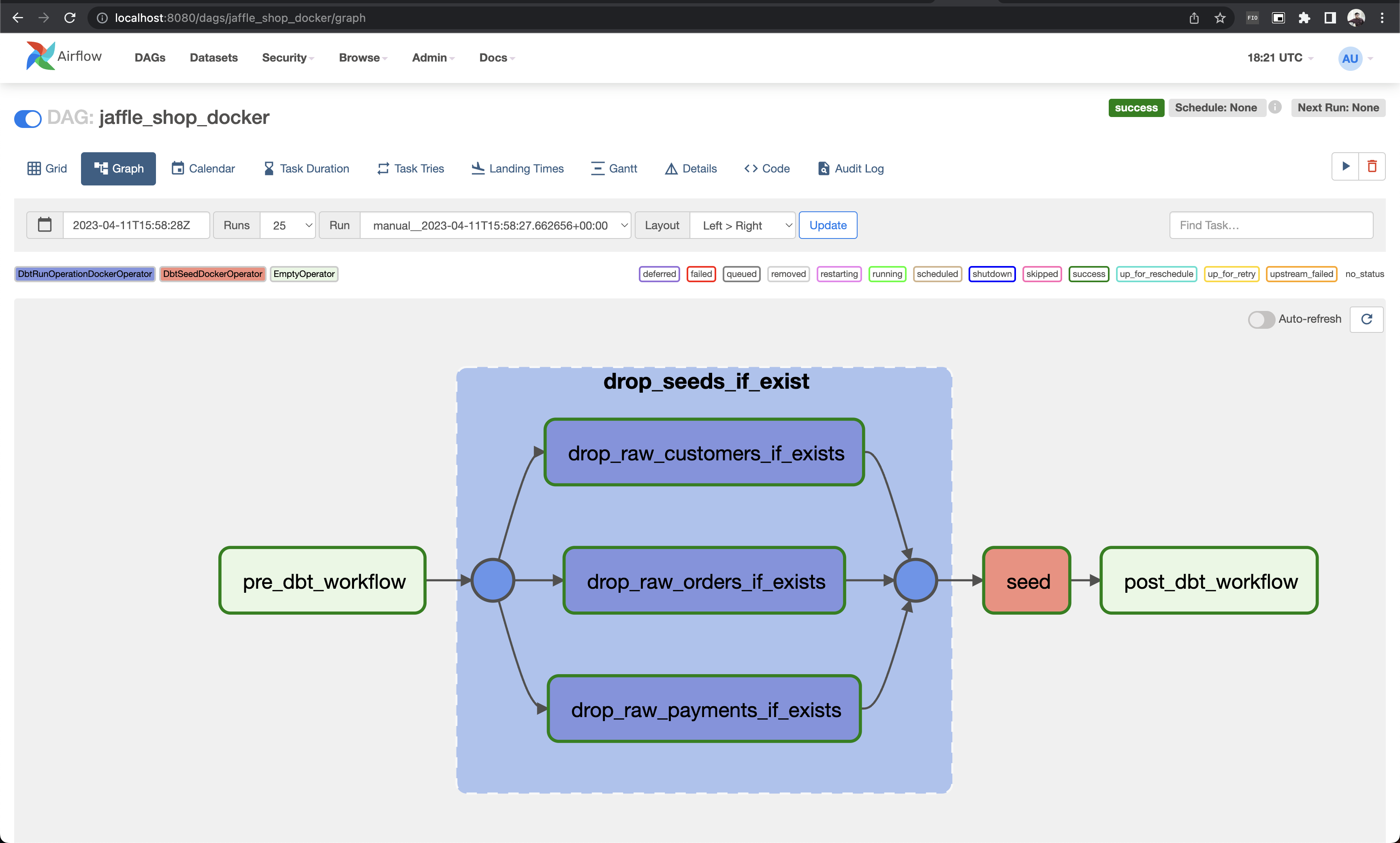
Specifying ProfileConfig#
Starting with Cosmos 1.8.0, you can use the profile_config argument in your Dbt DAG Docker operators to reference
profiles for your dbt project defined in a profiles.yml file. To do so, provide the file’s path via the
profiles_yml_path parameter in profile_config.
Note that in ExecutionMode.DOCKER, the profile_config is only compatible with the profiles_yml_path
approach. The profile_mapping method will not work because the required Airflow connections cannot be accessed
within the Docker container to map them to the dbt profile.
Troubleshooting#
If dbt is unavailable in the Airflow scheduler, the default LoadMode.DBT_LS will not work. In this scenario, you must use a Parsing Methods that does not rely on dbt, such as LoadMode.MANIFEST.