
Get started with your dbt project#
If you have a sample project that you want to use to test out Cosmos functionality, or, you want to see how to set up a more custom project, check out the Bring your Own project guides. These guides provide the general structure for how to set up a dbt project in Cosmos.
When you’re ready to set up and customize your Cosmos project, see the Guides.
Example Demo: Jaffle Shop Project#
If you don’t have your own project that you want to set up as a demo, you can explore a practical example in the Bring your own project guides to see how Cosmos can convert the dbt workflow into an Apache Airflow® Dag.
The jaffle_shop project is a sample dbt project that simulates an e-commerce store’s data. The project includes a series of dbt models that transform raw data into structured tables, such as sales, customers, and products.
The following diagram shows the original dbt workflow in a lineage graph. This graph illustrates the relationships between different models:
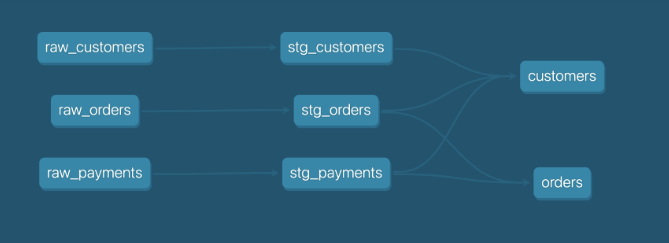
Cosmos can take this dbt workflow and convert it into an Airflow Dag, allowing you to leverage Airflow’s scheduling and orchestration capabilities.
To convert this dbt workflow into an Airflow Dag, create a new Dag definition file, import DbtDag from the Cosmos library,
and fill in a few parameters, such as the dbt project directory path and the profile name:
basic_cosmos_dag = DbtDag(
    # dbt/cosmos-specific parameters
    project_config=ProjectConfig(DBT_PROJECT_PATH),
    profile_config=profile_config,
    operator_args={
        "install_deps": True,  # install any necessary dependencies before running any dbt command
        "full_refresh": True,  # used only in dbt commands that support this flag
        "emit_datasets": "{{ dag_run.run_type != 'backfill' }}",  # do not emit assets on backfills
    },
    # normal dag parameters
    schedule="@daily",
    start_date=datetime(2023, 1, 1),
    catchup=False,
    dag_id="basic_cosmos_dag",
    default_args={"retries": 0},
)
This code snippet then generates an Airflow Dag like this:
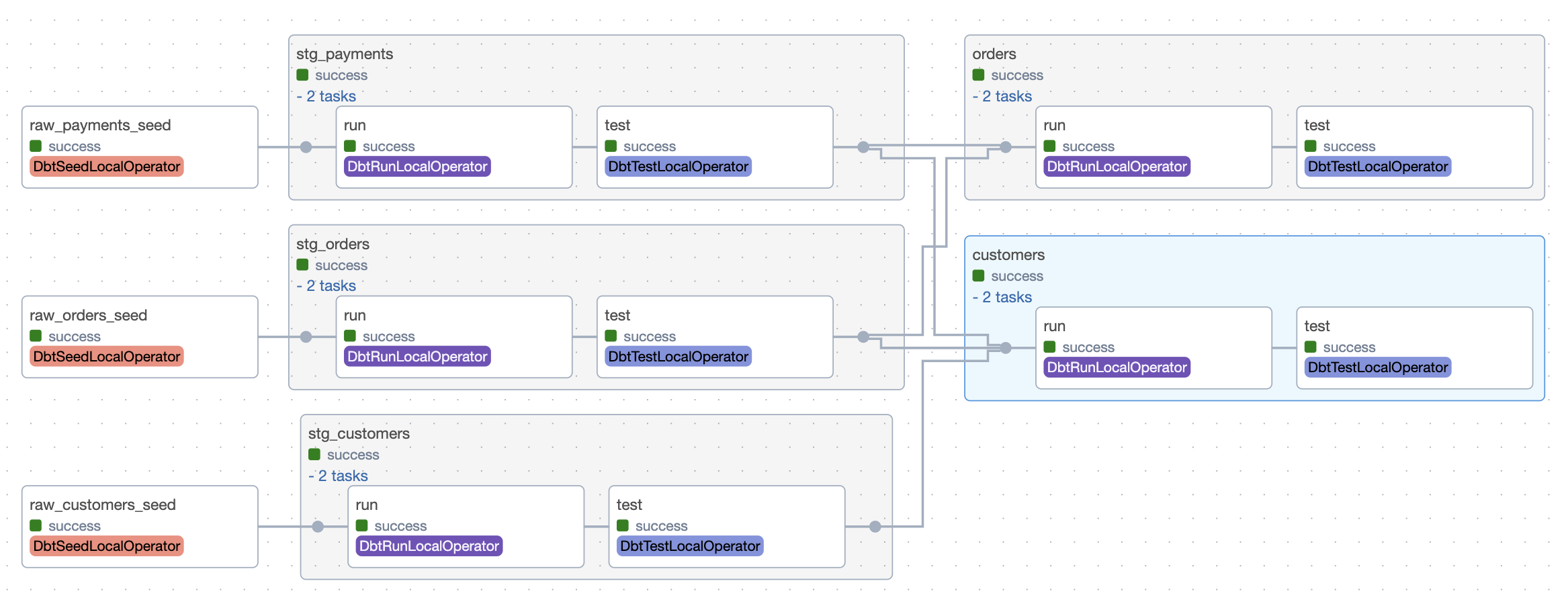
DbtDag is a custom Dag generator that converts dbt projects into Airflow Dags. It also accepts Cosmos-specific arguments like
fail_fast, to immediately fail a dag if dbt fails to process a resource, or cancel_query_on_kill, to cancel any running
queries if the task is externally killed or manually set to failed in Airflow. DbtDag also accepts standard Dag arguments such
as max_active_tasks, max_active_runs, and default_args.
With Cosmos, transitioning from a dbt workflow to an Airflow Dag is seamless, giving you the best of both tools for managing and scaling your data workflows.