
How Cosmos works#
Cosmos is an open-source Python package developed by Astronomer under the Apache License 2.0. The package includes classes that automatically turn dbt Core and dbt Fusion projects into Apache Airflow® workflows.
When using Cosmos you can write your data transformations using dbt and then use Airflow’s advanced orchestration capabilities to integrate your dbt projects into your end to end workflows, scheduled to run automatically.
Overview#
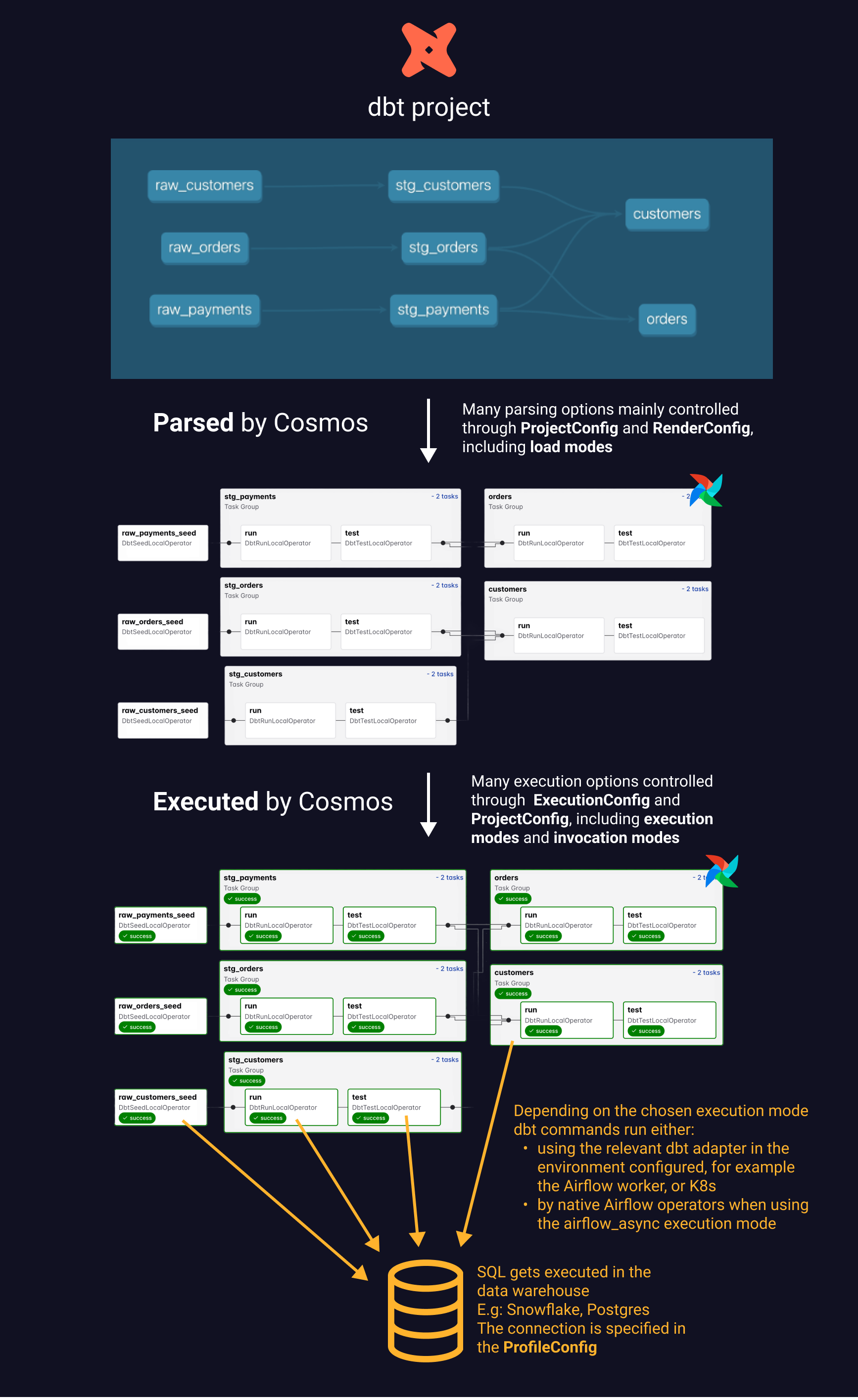
Cosmos creates an interface between a dbt project and Airflow, allowing you to translate your dbt project into a Dag. Then, your Cosmos configuration provides the necessary configurations to Airflow so that it can schedule and initiate running your dbt code when you want.
You have a number of configuration options, but fundamentally, Cosmos provides the following two functions:
Parse your dbt project: Cosmos parses your dbt project, and translates it into an Airflow Dag. This process uses the ProjectConfig and RenderConfig to customize specific behavior, allowing you to optimize how your dbt project is represented as a Dag.
Execute the dbt commands: Cosmos then executes the Dag, using the execution options in your ExecutionConfig and ProjectConfig to run dbt commands with the appropriate dbt adapter, finally resulting in your dbt SQL running in your data warehouse. Cosmos uses a connection defined in the ProfileConfig to execute your SQL in your data warehouse.
Quickstart#
Even though Cosmos is highly extensible, and you have many advanced customization options, you can run a demo with the Astro CLI in just a few minutes. This demo introduces you to the key elements required for Cosmos to parse dbt projects and run Dags.
Bring your own project#
If you have existing resources for Airflow or dbt, and want to start exploring how to get started with a project more similar to your use case, check out the Get started with Cosmos guides. These resources provide more general recommendations for how to create a new project.